
(Copy and Paste These)
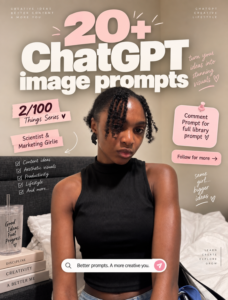
If you came here from Instagram, welcome. This is the full prompt library from my “20+ ChatGPT image prompts” post, the one where I promised you’d get to turn your ideas into stunning visuals without spending hours guessing what words to type into ChatGPT.
Here’s how to use every single one of these. Upload your reference photo first, then copy the prompt exactly as written below and paste it in. Some of these need you to fill in a bracket or two with your own details, so read through before you paste.
Save this page, because you’re going to want to come back to it. Click here to download pdf.
A Day in My Life Prompt
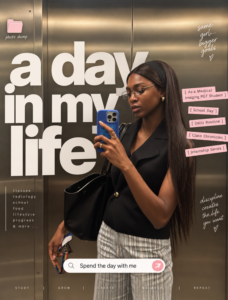
This one turns a normal photo into a Pinterest style content creator cover, complete with bold typography, accent labels, and that clean influencer branding look.
Upload your reference image and then copy the prompt below.
Create a modern Pinterest-style content creator cover using my uploaded photo. IMPORTANT: Keep my face, facial features, hairstyle, body proportions, skin tone, clothing, pose, and overall appearance exactly the same as in the uploaded image. Do not alter my identity. The uploaded photo must remain realistic, recognizable, and natural. Format Instagram portrait format 1080 x 1350 pixels 4:5 ratio Ultra-high resolution. Composition: use my uploaded photo as the full background, filling the entire canvas, minimalist editorial composition, Pinterest creator aesthetic, clean and modern, lifestyle influencer cover design, soft neutral tones, luxury content creator branding. Typography: add large oversized white typography layered across the center of the image. Main title “A day in my life.” Typography should be extra bold modern sans-serif, all lowercase, clean Pinterest aesthetic, occupy a large portion of the image, overlap naturally with the subject, have subtle transparency and soft shadows, editorial magazine style. Accent labels: add small blush-pink text stickers with bracket styling, examples like [ As a Content Creator ] [ Productive Day ] [ Daily Routine ] [ Content Ideas ] [ Work From Home ] [ Creator Lifestyle ] [ Vlog Inspiration ], soft pink background, dark rose typography, slight rotation, clean sticker appearance. Folder element: add a small pastel pink folder icon in the upper left corner with text below it reading “photo dump,” or alternatively “daily vlog,” “creator diary,” “content ideas,” “life lately,” or “weekly recap.” Search bar element: place a realistic rounded search bar near the bottom center, Apple-inspired UI, white rounded rectangle, soft shadow, with text inside like “My everyday routine,” “Spend the day with me,” “Creator lifestyle,” “Work day vlog,” “A productive day,” or “Content creator routine.” Include a small pink arrow upload/send icon on the right side. Color palette: white, soft cream, ivory, beige, warm grey, blush pink, dusty rose, minimal and feminine. Style: Pinterest viral aesthetic, clean girl aesthetic, content creator branding, luxury influencer cover, editorial magazine design, minimalist scrapbook aesthetic, social media cover art, modern typography poster, soft lifestyle photography, fashion creator moodboard, Apple-inspired UI elements. Lighting: soft natural lighting, neutral warm tones, clean shadows, luxury lifestyle photography, dreamy atmosphere. Quality: ultra realistic, luxury Pinterest quality, editorial magazine quality, professional graphic design, clean typography, highly detailed, 8K quality, Instagram-ready, photorealistic.
Pixel Prompt
Turns any photo into clean, high-quality 32-bit pixel art that looks like it came straight out of an NES-era game.
Transform the provided image into a clean and high-quality 32-bit pixel art style. Preserve the original composition, subject, and key details, but simplify forms into pixel-perfect shapes. Use a limited color palette typical of classic 8-bit games, with strong contrast and clear color separation. Apply crisp, hard edges with no blur, no gradients, and no anti-aliasing. Ensure consistent pixel size across the entire image, aligned to a strict grid. Maintain recognizable silhouettes and essential features while reducing unnecessary detail. Lighting should be simplified into flat shading with 1-2 tones per surface. Avoid noise, artifacts, or smudging. The final result should look like authentic retro game sprite art from NES-era games, highly readable and visually balanced.
3D Caricature Companion Prompt
This one gives you a Pixar-style mini version of yourself standing beside your real photo, interacting naturally, not some tiny disconnected mascot.
Create a premium high-quality 3D caricature companion of the person in the reference image while keeping the original realistic person fully present and untouched. The realistic person must remain photorealistic, highly detailed and faithful to the original photo. Create a stylized 3D caricature version of the SAME person standing beside them. Preserve the same outfit, hairstyle, accessories, fashion styling, identity, facial resemblance, attitude and vibe. The caricature must have large expressive eyes, slightly oversized head, smooth cinematic skin, Pixar/Disney-inspired premium 3D styling, smaller body proportions, but still look fashionable and recognizable, NOT childish, toy-like or baby-sized. IMPORTANT: the caricature height should be approximately shoulder to ear level of the real person, never tiny or child-sized. The caricature and real person must be physically and emotionally interacting naturally. Examples of interaction include holding hands, looking at each other, walking together, sharing an object, leaning, playful pose, touching shoulder, mirroring pose, reacting to each other, casual chemistry, candid companionship. The caricature should feel like a living animated version of the same person existing in the same world. Preserve original scene, lighting and perspective whenever possible. Professional photography composition, cinematic lighting, realistic shadows, luxury editorial realism mixed with premium stylized 3D animation. No tiny companion, no side mascot, no disconnected pose, no separate standing character, no toy proportions, no plastic doll look, no replacing the original person.
Minecraft Style Poster Prompt
Converts your entire photo into a realistic Minecraft voxel world while keeping your exact pose and composition intact.
High-quality cinematic Minecraft-style image transformation. Convert the entire uploaded image into a realistic Minecraft-inspired world while preserving the exact original composition, framing, camera angle, zoom level, crop, subject placement, body proportions, pose, perspective, and overall scene layout from the uploaded photo. CRITICAL: do NOT change the image aspect ratio, image dimensions, framing, crop, zoom level, subject scale, or camera distance. The transformed image must match the original image composition exactly. Transform the environment into a fully Minecraft-inspired voxel world where terrain becomes cubic Minecraft blocks, trees become blocky voxel trees, water becomes pixelated Minecraft water, and rocks, mountains, roads, grass, clouds, and foliage become Minecraft-style blocks. Lighting and shadows should feel like realistic Minecraft shaders, maintaining environmental depth and atmosphere from the original image. The human subject should remain highly recognizable with the same pose, clothing structure, facial direction, hairstyle silhouette, body positioning, proportions, and perspective, but convert the person into a realistic cinematic Minecraft-style character with Minecraft-inspired block geometry, voxel-textured clothing, realistic shader rendering, smooth cinematic Minecraft lighting, and game-like realism similar to ultra-realistic Minecraft RTX gameplay. Keep the image looking immersive, cinematic, and ultra detailed, like a high-end Minecraft gameplay screenshot with realistic shaders and volumetric lighting. Include realistic Minecraft RTX lighting, cinematic fog and atmospheric depth, voxel shadows, block-textured terrain, realistic reflections if water is present, realistic Minecraft-style environmental rendering, ultra detailed cinematic shader effects, and authentic Minecraft visual identity. The final image should feel like a real photograph transformed directly into a cinematic Minecraft universe, realistic Minecraft gameplay, ultra detailed voxel world rendering, stylized but believable game realism. The final output must preserve the exact original image structure while transforming the entire scene into a realistic cinematic Minecraft world.
Messy Handwritten Notes Prompt
Great for anything you want to look like a cute, slightly chaotic but still readable handwritten journal spread.
Create a composition inspired by messy handwritten notes, while maintaining clear visual hierarchy and readability. Core structure: establish a clear focal element, either text or an object, position it near center or slightly offset using the rule of thirds, and ensure it occupies the largest visual weight. Elements should include handwritten-style text blocks that vary in size and importance, arrows, circles, highlights and underlines, and small doodles and icons like stars, lines, and simple shapes. Hierarchy control: the primary focal element should be largest and clearest, secondary supporting notes medium sized, and tertiary small doodles and accents at the smallest scale. Chaos control: use clustered messiness rather than full-frame randomness, keep clear breathing space around the focal point, and avoid overlapping critical content. Structure should follow a hidden grid alignment underneath, with intentional spacing between clusters and directional elements like arrows and lines guiding the eye. Color system: base in white or paper tone, ink in black or dark grey, with a maximum of one to two accent colors. Style should feel imperfect, human, and slightly chaotic but controlled, sketch-like but still readable. Mood should be personal, expressive, and slightly playful. Balance rule: keep 60 to 70 percent of the space structured, with 30 to 40 percent as messy expression.
Watercolor Painting Poster Prompt
Turns your photo into a soft watercolor painting while keeping your actual features and pose untouched.
Transform the provided image into a soft watercolor-style painting. Preserve the original subjects exactly as they are, do not alter their facial features, expressions, pose, clothing, or proportions. Place both subjects clearly in the center of the composition, maintaining a balanced and natural framing. Apply a delicate watercolor effect with smooth brush strokes, subtle color blending, and a light, artistic texture. Keep the background minimal and softly blended to enhance the subjects. Ensure the final output is in a vertical 9:16 aspect ratio with high resolution and a clean, aesthetic finish.
Sock Puppet Prompt
This one is pure chaos in the best way. Reimagines your photo as a handmade sock puppet scene, stitches and all.
Reimagine the uploaded photo as a scene performed entirely by handmade sock puppets. Preserve the exact composition, camera angle, framing, crop, subject position, pose, and scene layout from the original photo, every element must remain in the same place at the same size, only the visual medium changes. Convert every human subject into a sock puppet, a knitted or cotton sock covering an unseen hand, with the toe forming the head and a folded mouth opening at the heel. Two large mismatched button eyes glued or sewn on, sometimes googly plastic eyes, sometimes felt eyes. Yarn hair sewn to the top, simple felt accessories like cardboard glasses, a tiny knit hat, a bow tie, or a ribbon. Visible big crooked stitches in contrasting thread. Sock fabric slightly worn, faded, soft cotton or wool, sometimes with stripes or patterns. The hand inside is implied but not visible. Pose is whatever the original showed but interpreted as the natural shape a hand can make inside a sock, slightly awkward, charming. Lighting should be warm and soft, homemade, like a kid’s bedroom puppet show, with a slight handheld feel. The scene behind the puppets becomes a simple painted cardboard backdrop or fabric curtain version of the original setting. Lovingly homemade DIY aesthetic, like a child’s craft project.
Studio Ghibli Effect Prompt
The one everyone’s been obsessed with. Turns your photo into a still frame straight out of a Miyazaki film.
Reimagine the uploaded photo as a still frame from a Studio Ghibli film directed by Hayao Miyazaki. Preserve the exact composition, camera angle, framing, crop, subject position, pose, and scene layout from the original photo, every element must remain in the same place at the same size, only the visual medium changes. Render the scene with the unmistakable Ghibli 2D hand-drawn animation aesthetic, characters with soft rounded faces, large expressive but gentle eyes with simple highlights, small noses, soft chins, slightly pinkish cheeks, naturally-styled flowing hair drawn with confident clean ink lines. Bodies have soft natural proportions, clothing drawn with flowing organic folds. Skin and faces are colored with two-tone cel-shading, a base flat tone and one gentle shadow tone, no airbrushing. Backgrounds are painterly watercolor masterpieces, soft brush textures, layered washes of color, every blade of grass, leaf, cloud, and building lovingly detailed. Soft ambient natural lighting, often with golden warm tones, dappled sun, or magical hour light. The mood is gentle, nostalgic, peaceful, with a hint of wonder. Color palette favors muted greens, sky blues, sun-warmed yellows, soft earth tones. The image looks like a frame from a hand-painted 1990s animated film, 1920×1080 cinema aspect-feel, with the slight texture of cel and painted background composite.
Simstagram Prompt
Makes you look like an actual Sims 4 character, plumbob and all, without going full cartoon.
Transform the image into a realistic Sims 4 / Simstagram portrait edit. The person should look like a real-life Sim character inside The Sims game. Preserve identity and realistic photography. Do NOT create illustration or cartoon style. Style should be realistic Sims 4 aesthetic, Simstagram edit, gameplay screenshot feeling, cozy lifestyle portrait, Pinterest aesthetic, soft social-media edit. Composition should be clean portrait framing, centered or balanced subject, simple background, realistic photography, soft lifestyle pose, natural facial expression. Mandatory Sims elements: add a realistic Sims plumbob floating above the head, faceted diamond crystal, glowing, centered, iconic Sims green plumbob. Add a Sims gameplay HUD overlay, bottom game interface bar, play and pause controls, time controls, Sim status interface, money counter, game screenshot appearance. Add floating Sims interaction prompts and thought bubbles, rounded glossy UI, white pill boxes, cute lifestyle actions like shopping, romance, hobbies, food, self-care, and mood icons. Include Sims mood and thought icons, soft UI shadows, floating interaction labels, and the gameplay screenshot illusion. Color and light should be bright, cozy, soft daylight, clean exposure, warm natural skin, Instagram aesthetic. IMPORTANT: the final image must look like an authentic Sims gameplay screenshot using a real person. Do not create fantasy art, cartoon, or illustration. Keep the photorealistic person with a Sims UI overlay.
Minecraft Food Prompt
Only turns your food and drinks into Minecraft blocks while keeping you and everything else fully realistic. Great follow-up to the full Minecraft prompt above.
Transform ONLY the food and drinks in the original photo into authentic Minecraft-style voxel food while keeping everything else fully realistic and untouched. The transformed food must clearly resemble the actual food or drinks in the image, converted into Minecraft items, not random Minecraft foods. Keep humans, skin, faces, clothing, hands, background, furniture, and lighting completely photorealistic, along with the exact original camera angle, composition, perspective, and environment. Minecraft food rules: convert visible food and drinks into blocky voxel versions of themselves, using authentic Minecraft textures, pixelated, low-resolution, square edges, visible cube faces, no smooth shading or gloss. Coffee should become a pixelated Minecraft latte or coffee block while still matching the original drink. Add floating Minecraft inventory-style labels near each food item using white pixel font, dark semi-transparent UI boxes, readable placement without covering people. Lighting and shadows must match the real scene naturally. Hard rules: only food and drinks are transformed, no random Minecraft foods added, background and people remain untouched, and labels must match the actual food shown in the image.
Flat Editorial Prompt
A calm, minimalist illustration style with big geometric color blocks and no photorealism at all.
A flat editorial illustration of the person from the attached photo, wearing the clothes from the photo, set in a clean geometric interior with large vertical and horizontal color blocks. Features simplified facial traits, elongated soft proportions, a matte gouache texture, subtle paper grain, and a calm mood. Controlled negative space, no black outlines, no photorealism, no 3D render, no clutter. Vertical 4:5 composition.
Cinematic Beach Exposure Prompt
A dreamy double exposure effect blending your profile with a sunset beach scene.
A cinematic one exposure of me in profile, with sunset beach landscape blended into silhouette. Inner scene shows me walking on the wet sand, looking at the beach. There must be no other person and me only in the picture.
Geometric Editorial Cartoon Portrait Prompt
This one needs a little customization from you, but it makes a genuinely striking angular cartoon portrait. Fill in the brackets before you paste it.
Create an original cartoon character portrait in a bold geometric animation style. STYLE: utilise a clean, modern 2D cartoon portrait style featuring sharp, angular face planes, an elongated neck, exaggerated proportions, crisp, vector-like shapes, flat cel-shaded lighting, strong silhouettes, and high-contrast graphic shadows. The image should feel like a polished character design from a stylish animated series. Keep the rendering clean, minimal, and poster-like, avoiding a realistic appearance. Use a plain solid-color background. CHARACTER: create a pretty-looking character with a unique personality and silhouette. The character should feel [confident / elegant / mischievous / cold / glamorous / rebellious / mysterious]. Avoid copying any existing character or previous portrait. FACE AND EXPRESSION: the face should be stylised with angular cheekbones, simplified nose, strong eyebrows, expressive half-lidded eyes, and clean graphic lips. Expression: [confident smirk / aloof gaze / playful smile / unimpressed stare / seductive calm / proud look]. HEAD POSITION: use a distinct head pose, not a standard front-facing template. Pose: [near-profile with chin lifted / over-the-shoulder looking back / low-angle looking down at viewer / head tilted sideways / three-quarter pose with chin lowered / dramatic upward glance]. HAIR: give the character a distinctive hairstyle: [short platinum sculpted curls / long copper ponytail / asymmetrical bob / high sleek ponytail / curly undercut / braided crown / dramatic side-swept hair / geometric afro / sharp angular bangs]. Hair colour: [choose colour]. OUTFIT AND ACCESSORIES: dress the character in a stylish simplified outfit with bold geometric shapes: [one-shoulder dress / sleeveless top / cropped jacket / high collar / elegant black dress / futuristic halter top]. COLOR PALETTE: use a unique solid background colour: [pale lemon yellow / saturated lavender-purple / mint green / deep wine red / powder pink / electric blue / warm sand / icy grey-blue]. Character palette: [skin tone], [hair colour], [outfit colour], [accent colour]. COMPOSITION: vertical 9:16 bust portrait, character fills most of the frame, clean negative space, no text, no logo, no complex background, no realism, no 3D render, no soft painterly detail. FINAL IMAGE: a polished original cartoon character portrait with bold geometric cel-shading, stylish fashion attitude, expressive face, unique silhouette, and a distinctive background colour.
Souvenir Magnet Trend Prompt
Splits your travel photo into two halves, a real bottom photo and a miniature enamel magnet version up top. This one’s been everywhere lately.
Please use the real photo I provide to create a travel souvenir poster divided into two equal sections. The image should have a vertical 3:4 aspect ratio and be split exactly 50/50 horizontally, with the souvenir magnet in the top half and the original travel photo in the bottom half. The bottom half should preserve the original composition and remain realistic, natural, and true to the source image. Keep the photography sharp and detailed, with authentic lighting, natural colors, and an iPhone-style travel photography aesthetic. Avoid artificial blur, cinematic depth of field, exaggerated HDR effects, oversaturated colors, or unrealistic lighting. The location should remain the primary focus of the image, with the people serving as part of the scene rather than dominating it. The top half should feature a small enamel souvenir magnet that recreates the exact scene shown in the bottom photo. The magnet should represent the same people, pose, viewpoint, landmark, architecture, and surrounding environment, making it feel like a miniature collectible version of the photo below. Do not invent new elements or create a different scene. The magnet should have metallic outlines, clean enamel styling, and moderately simplified details while preserving the most recognizable features of the location and subjects. It should look like a real souvenir magnet rather than a sticker, cartoon, or miniature photograph. Keep the magnet centered in the upper half and relatively small, leaving a large amount of negative space around it. The background of the top section should be a solid color derived from the overall mood and color palette of the original image, complementing the destination without overpowering the magnet. The overall result should feel like a premium travel postcard or souvenir collection piece, with a strong contrast between the realistic travel photo below and the elegant enamel magnet above. Do not include any text, logos, watermarks, borders, or additional decorative elements.
Modern Geometric Folk-Art Illustration Prompt
Bold, colorful, cubist-inspired folk art with oversized eyes and neon pastel tones.
Transform this image into a modern geometric folk-art illustration, oversized eyes, cubist-inspired facial construction, bold polygonal clothing, textured gouache painting, dry pastel grain, rough hand-drawn outlines, vibrant neon pastel palette, contemporary editorial artwork, graphic designer poster aesthetic, whimsical character design, decorative symbolic elements, abstract doodles, flat color blocking, high contrast, handcrafted digital painting, premium art print quality.
Couple LEGO Prompt
Works with any two people, not just couples. Turns you both into authentic, catalogue-quality LEGO minifigures.
Using the uploaded image as the reference, transform the people into authentic LEGO minifigures while preserving their exact identity, facial features, hairstyle, facial expression, clothing, accessories, pose, body language, and overall composition. Recreate all clothing as realistic LEGO torso and leg prints, accurately matching the original colours, patterns, and details. Convert each hairstyle into a detailed LEGO hair piece that reflects the original colour, texture, length, curls, and styling. Translate facial features into high-quality LEGO face printing while maintaining strong recognisability and capturing each person’s unique appearance and expression. Use authentic LEGO minifigure proportions, including official-style LEGO heads, hands, arms, legs, and body structure, ensuring the figures resemble premium custom LEGO minifigures rather than generic toys. Present the scene as professional LEGO product photography on a clean white seamless studio background with soft diffused lighting, subtle realistic shadows, glossy ABS plastic material, realistic LEGO reflections, ultra-sharp focus, and premium commercial advertising quality. The final image should look like an official LEGO promotional photograph or collectible minifigure catalogue image. Do not create real humans, do not alter the original pose, outfit colours, accessories, camera angle, composition, or subject placement. Do not add extra accessories, do not crop the subjects, and do not use cartoon, chibi, or other stylised toy aesthetics outside authentic LEGO design.
Claymation Prompt
The funniest one on this list. Turns your photo into an absurd, hilariously exaggerated Aardman-style clay world.
Strict composition and absurdist claymation transfer, a high-detail 3D reimagining that preserves the EXACT spatial layout, object positioning, and structural composition of the provided reference image. Do not move or remove elements, transform them into a grotesque, humorous clay world. Style: extreme Aardman-inspired caricature with an absurdist twist. Subjects feature wildly uneven proportions, noodle-like rubbery limbs, bulging ping-pong ball eyes looking in slightly different directions, and massive, toothy grins with oversized chiclet teeth and visible pink gums. Every character must look hilariously startled or over-enthusiastic. Texture and messy aesthetic: everything is rendered as heavy, matte plasticine. Introduce wonky geometry, no straight lines or perfect edges, every surface has a hand-sculpted jitter and lopsided feel. The clay shows extreme tactile imperfections, deep messy thumbprints, accidental fingernail scratches, rough seams, and tiny bits of dust or lint stuck to the surface.
Botanical Editorial Prompt
Surrounds you with hand-drawn flowers, vines, and little garden creatures without ever touching your actual face or pose.
Edit this photo in a mixed media editorial style. IMPORTANT: do not change, alter, or regenerate the main subject, preserve their face, pose, outfit, skin tone, and lighting exactly as they appear in the original photo. The person must look identical to the uploaded image. Vector style, critical to match this exactly: hand-drawn illustrative vector style, not glossy, not like inflated stickers. Think loose cartoon illustration with organic, imperfect outlines that feel hand-drawn, slightly wobbly and gestural, not perfectly smooth. Flat color fills with minimal shading, maybe a single subtle highlight stroke at most. Flowers with long bendy stems that curve and lean naturally, large daisy-type blooms, tulip shapes, small buds, oversized leaves, botanical and garden inspired. Colors are cheerful and saturated but not neon, use soft hot pink, coral, peach, lavender, grass green, cobalt blue, golden yellow, warm orange. Elements feel scattered and alive, like they are growing, floating, and moving organically through the scene. Include small fun characters or details like tiny bees, small butterflies, mini sun, little mushrooms, ribbon-like swirls. Black outlines throughout but varying in weight, thicker on main shapes, thinner on details. Placement and height rules: illustrations grow from the ground or feet upward, blooming behind and around the lower half of the subject’s body. Vector elements reach maximum up to the waist or chest, hard ceiling, nothing above. Stems and flowers can lean into the frame from the sides as well, not just from below. Some elements can scatter loosely at the very bottom corners and edges of the frame. The subject always sits in front of the illustration layer, never buried. White hand-drawn doodles: small, spare white linework above the chest, tiny stars, sparkle marks, loose swirls, mini hearts, and single-line gestures, light and airy, not clustered. Composition structure: bottom and sides get loose botanical illustrations, densest at ground level, some leaning in from edges. Waist to chest, illustrations thin out naturally. Above chest, clean photo only with tiny white doodle accents in the open background. Overall feel should be like the subject is standing inside a living illustrated garden that has grown around them. Playful, editorial, organic, like a hand-illustrated fashion magazine spread. Real photography plus loose cartoon botanical illustration. Joyful, warm, and visually alive.
Doodle Prompt
Adds playful hand-drawn doodles and captions that actually react to what’s happening in your photo, no two results are ever the same.
Analyze the uploaded image and preserve the original subject, composition, and lighting. Do not alter the identity or structure of the main subject. Add playful, hand-drawn doodles that interact directly with the subject in the image. The doodles should mimic, follow, or exaggerate the shapes, gestures, or motion present, such as outlining poses, extending limbs, adding motion lines, or creating imaginative elements that respond to the subject. Ensure the doodles feel naturally integrated into the scene, as if they were drawn on top of the photo with intention. Use a sketchy, imperfect, hand-drawn style with organic lines, slightly uneven strokes, and a casual illustrated feel. Include whimsical handwritten text elements placed around the image, matching the mood or implied context of the scene, with a playful and spontaneous tone. Avoid fixed phrases, generate context-aware, creative, and humorous text that fits each unique image. Maintain a balanced composition so the doodles enhance the image without overwhelming the original subject. Keep the overall aesthetic fun, expressive, and social-media-ready. High resolution, clean overlay, vibrant yet natural color harmony.
Paper Craft Illustration Prompt
Gives your photo a soft, layered paper-cut look, like a diorama someone built by hand.
Convert this image into a soft, handcrafted paper-cut layered illustration style, inspired by papercraft diorama aesthetics. Use smooth rounded shapes, simplified cute character proportions, and minimal facial details, dot eyes, blush cheeks, to create a warm, charming look. Apply stacked paper layers with visible depth, subtle shadows between layers, and clean cut edges that resemble laser-cut cardstock. Add a distinct white outer outline layer surrounding each main character, resembling a thick sticker border or white cut-paper backing, clearly separating the characters from the background. This white layer should feel like an intentional paper layer, not a glow. Use a pastel color palette with muted blues, greens, and warm neutrals, balanced and calming. Lighting should feel soft, diffused, and even, enhancing the dimensional paper layers without harsh contrast. Textures should appear matte and tactile, like thick art paper or craft foam. Overall mood: cozy, wholesome, gentle, and storybook-like, with a playful yet polished handcrafted feel suitable for modern illustration, children’s books, or decorative art.
Whimsical Doodle World Prompt
Keeps you completely photorealistic while replacing only the background with a crayon-drawn, storybook world.
Analyze the uploaded image and preserve the original subject, composition, and lighting exactly. Do not alter the identity, pose, clothing, or structure of the main subject in any way. Replace only the background with a whimsical, hand-drawn crayon or colored pencil doodle scene on a white or off-white paper-like surface. The doodle background should feel like a child’s imaginative drawing, featuring loose, expressive strokes with bold outlines, simple shapes, and playful details like a smiling sun, fluffy clouds, scribbled grass, birds, or other scene-appropriate elements. The subject must remain photorealistic and sharp, while the background is fully illustrated in doodle style. The two elements should blend naturally at the edges, no hard cutouts or visible masking. Match the doodle’s color palette loosely to the subject’s outfit or mood for a cohesive, storybook feel. Overall aesthetic: joyful, cute, and whimsical, like the subject stepped into a hand-drawn world.
Paper Cuttings Poster Prompt
Turns your entire photo into a torn-paper collage that looks assembled by hand from newspapers and magazines.
Make the attached image into a collage artwork. Newspapers, magazines, and leaflets are torn by hand and pasted with glue, all expressions are completed with large torn paper. The torn section, crumpling, overlapping, and fold marks of the paper are expressed in detail. Don’t use pieces of paper too small, place them randomly at different angles and directions, the direction of the paper rotates randomly, and make it look like a real collage that a person roughly pasted by hand.
4-Year-Old Crayon Drawing Prompt
Turns your photo into the most adorably bad crayon drawing, the kind only a toddler could make.
Transform the attached image into a drawing that looks like it was made by a very young child, around 3 to 4 years old, using crayons. The drawing should feel silly, clumsy, and adorably bad, as if the child was trying to draw what they saw but only vaguely understood the subject. The lines should not be straight or clean. Avoid adult-level composition, realistic proportions, accurate anatomy, detailed shading, or polished illustration. Make it look awkward, naive, uneven, and a little random, like it was drawn from a toddler’s point of view. It is okay if the result looks messy, strange, funny, and not fully accurate to the original image. Style: childish crayon drawing, rough scribbly lines, uneven shapes, simple colors, imperfect proportions, loose interpretation of the attached image.
Decorative Folk Flat Illustration Prompt
A bold, faceless, storybook-style flat illustration with a completely reimagined color palette.
Please transform the entire image into a single decorative folk flat illustration with doodle elements. Use a bold and playful color palette, completely different from the original image. Simplify all details into clean, flat shapes with a handmade, slightly imperfect feel, as if drawn on a sheet of white paper. The overall style should look cute, childlike, and whimsical. Faceless.
Scrapbook Prompt
Turns your photo into a polished sticker collage cover, the kind you’d see on a limited edition magazine.
Transform the uploaded photo into a sticker collage scrapbook cover effect. Use the uploaded image as the ONLY identity reference for the subject. Preserve identity, face shape, hairstyle, expression, outfit cues, and overall recognizability while rendering the final concept in a polished, premium, highly shareable way. Build the full scene around the exact visual language implied by the title. Keep the subject clearly readable. Add the right atmosphere, props, and composition cues to make the concept instantly understandable. Negative constraints: no identity drift, no extra people, no broken anatomy, no muddy rendering, no generic AI artifacts, and no irrelevant mixed styles.
My Toon Twins Prompt
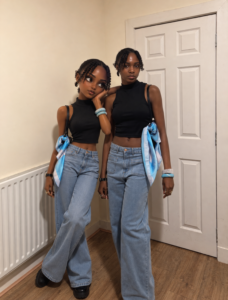
Very similar to the 3D caricature companion above, another version of you standing beside your real self, animated and full of personality.
Create a premium high-quality 3D caricature companion of the person in the reference image while keeping the original realistic person fully present and untouched. The realistic person must remain photorealistic, highly detailed and faithful to the original photo. Create a stylized 3D caricature version of the SAME person standing beside them. Preserve the same outfit, hairstyle, accessories, fashion styling, identity, facial resemblance, attitude and vibe. The caricature must have large expressive eyes, slightly oversized head, smooth cinematic skin, Pixar/Disney-inspired premium 3D styling, smaller body proportions, but still look fashionable and recognizable, NOT childish, toy-like or baby-sized. IMPORTANT: the caricature height should be approximately shoulder to ear level of the real person, never tiny or child-sized. The caricature and real person must be physically and emotionally interacting naturally. Examples of interaction include holding hands, looking at each other, walking together, sharing an object, leaning, playful pose, touching shoulder, mirroring pose, reacting to each other, casual chemistry, candid companionship. The caricature should feel like a living animated version of the same person existing in the same world. Preserve original scene, lighting and perspective whenever possible. Professional photography composition, cinematic lighting, realistic shadows, luxury editorial realism mixed with premium stylized 3D animation. No tiny companion, no side mascot, no disconnected pose, no separate standing character, no toy proportions, no plastic doll look, no replacing the original person.
iPhone Mirror Selfie Portrait Prompt
Places you inside a tiny, cluttered convenience store taking a distorted mirror selfie. Weirdly specific and weirdly satisfying.
Ultra-realistic iPhone mirror selfie inside a tiny colorful convenience store, identity preserved exactly from reference image. Young woman taking a selfie into a large circular convex mirror mounted on the wall. One hand holds her phone while the other hand holds a red apple near the mirror, oversized yellow sweatshirt. Tiny cluttered store interior behind her with snacks, posters, shelves, random colorful products, fluorescent ceiling lights, metallic surfaces, orange and red accents, cramped layout. Convex mirror distortion creates stretched curved reflections around the edges. White playful text written across the mirror saying “Hey, It’s me!” in chunky soft lettering. Slight iPhone flash reflection, natural skin texture, realistic grain, imperfect framing, candid Pinterest-style snapshot aesthetic.
Cozy Pastel Crayon Illustration Prompt
Soft, dusty, storybook-style crayon art with a cozy interior background built around your original photo’s vibe.
Turn my photo into a cozy pastel crayon illustration with a soft handmade texture, style of a modern children’s picture book, textured oil pastel and wax crayon effect, dusty muted colors, creamy beige background, simple rounded anatomy, tiny facial features, fluffy dark hair with chunky texture, pink cheeks, cozy oversized colorful clothes. Soft grain and paper texture everywhere, imperfect hand-drawn lines, warm minimal interior with ceramic decor. Cute and calm emotional atmosphere. Also adapt the background when you create images and keep the background a little authentic with the same vibes.
Vector Portrait Illustration Prompt
A bold, artsy, Picasso-meets-kawaii portrait with flat colors and a gallery poster feel.
Create a cute neo-expressionist cubist minimal vector portrait illustration, Picasso meets kawaii minimalism, inspired by stylized fashion editorials and playful modern art. Ultra-simplified exaggerated facial features with oversized abstract eyes, flat cartoon eye shapes, minimal black dots or single curved strokes, no realistic iris details, no eyelashes, extremely reduced facial detail. Tiny abstract nose drawn with one short angular line. Small single-stroke lips, tiny soft geometric mouth shape, minimal expression marks, no realistic mouth anatomy. Rounded cheeks, dreamy innocent expression, playful asymmetrical proportions, elongated elegant neck, simplified geometric facial planes, stylized angular hair shapes, subtle caricature aesthetics, childlike artistic distortion. Use clean scalable vector shapes, flat color blocking, bold primitive contour lines, sharp bezier curves, abstract polygon composition, minimal linework, naive handmade drawing quality, expressive empty space, icon-like facial abstraction, no realistic rendering, 2D primitive facial symbols. Add subtle oil pastel grain overlays, rough handmade brush accents, raw scribbled handwritten marks, visible pigment texture, silkscreen poster feeling. Vibrant limited color palette against a deep matte black background. Luxury editorial gallery poster composition, contemporary fashion illustration, artsy modern cubist poster, stylish and adorable, premium print-ready vector artwork.
Split Screen Digital Art Prompt
Half real photo, half cartoon illustration, divided by a torn paper edge right down the middle.
High-detail 8K split-style composition where the subject is divided vertically into two halves. Left side: keep the original photo fully realistic, preserve natural lighting, textures, and fine details, slightly enhance sharpness and clarity, add subtle hand-drawn doodle outlines in soft pastel or neon lines around the subject for a creative aura. Right side: transform the same subject into a stylized cartoon or digital illustration, maintaining the exact same pose, angle, and facial expression, using clean lineart, soft shading, and pastel or vibrant colors in a modern cute style, chibi or semi-realistic. Add small decorative elements like sticker-style doodles, cute icons, or mini characters floating around. Background: keep the original background unchanged on both sides, do not replace, redraw, or stylize it, maintaining consistency across the entire image. Center division: add a vertical torn-paper or glitch-style transition separating the realistic and illustrated halves. Style: modern digital art, clean composition, soft lighting, aesthetically pleasing, social media style. Quality: 8K resolution, ultra-detailed, vertical 3:4 aspect ratio.
Y2K Tamagotchi Screen Prompt
Turns your photo into a tiny, nostalgic pixel scene living inside a 90s Tamagotchi screen.
Change the image to a Y2K Tamagotchi screen from the 90s. Keep the original characters and situation, but simplify and rethink it with cute and tiny 8-bit pixel characters and backgrounds. Create a bright and cute LCD pastel palette using cream, pink, mint, and lavender, dot matrix texture, large pixels, limited 4-color, flat screen. Include the battery icon, status line, menu icon, heart, level, date and time, short text pixels, and retro UI. Make the device’s body, buttons, rims, and frame invisible. Make it look like a strong and cute Tamagotchi pixel screen, with a visible screen inside.
Playful Human-Animal Flat Vector Poster Illustration Prompt
A clean, deadpan cartoon style perfect for photos with your pet. Just fill in the brackets.
Playful flat-vector poster illustration of [HUMAN] posing with [ANIMAL] in [POSE], wearing [CLOTHING], set in [SCENERY]. Use clean thick black outlines, simple rounded geometric shapes, flat solid color fills, minimal facial details, small neutral eyes, calm deadpan expression, simplified hands and body proportions, pastel color blocking, sparse confetti doodles, tiny abstract icons, clean negative space, crisp graphic poster layout, and a controlled [PALETTE]. Vertical 4:5 composition.
Vogue Style Prompt
Turns you into a Vogue-quality fashion sketch, loose ink lines and all, while keeping your actual features intact.
Turn this photo into a Vogue-style fashion illustration, preserving identity and facial features. Minimalist hand-drawn fashion sketch with elegant elongated proportions, bold black ink contours, loose confident linework, flat marker colors, abstract blush accents, graphic lips, stylized eyes, expressive ink hair, and simplified geometric clothing. Clean white background, scanned paper texture, modern luxury editorial fashion illustration.
Pixel Town Prompt
Keeps you completely realistic while dropping you into a retro 16-bit RPG town background.
Recreate this photo but transform the background into a retro 16-bit pixel art video game scene, think classic RPG town or side-scroller level with pixelated buildings, chunky pixel clouds, and a bright pixel sky. Add cute hand-drawn doodle elements floating around the subject like sparkles, tiny stars, small hearts, and simple cartoon icons like pixel coins or little mushrooms. Keep the foreground subject realistic and sharp, do not alter or stylize the person, preserve their exact appearance, outfit, and pose. The overall vibe should feel like the person just stepped into a cute retro game world. High quality, playful, dreamy.
That’s the full library. If you try any of these, tag me so I can see how they turned out, and drop a comment on the Instagram post if you want first access whenever I add new prompts to this page.

I love reading your blogs! Thanks so much for the tips both in the blog and on your YouTube channel. As a new Interior Design student, I find them to be incredibly helpful, interesting, and inspirational. Keep up the great work!
Great tips! I’ve just discovered your Youtube channel, and I love it! Thanks for sharing your content and the day and life of a designer.
I am really impressed by the way you are doing business and I am just inspired by it!